Accessibility Hack: Leveraging YouTube’s Free Automatic Captioning
Accessibility
Phase2
June 10, 2016
1 in 20 people (48 million Americans) have some degree of hearing loss...This is not just those who are profoundly deaf or have severe hearing loss: it’s the most common injury among veterans, impacting 414,000 post-9/11 veterans. And 1 in 3 Americans 65 years and older experience hearing loss. Yes, their listening perception is still intact, but it is tiring to focus to listen. Take it from me, who uses her cochlear implants to listen all day long:listening is exhausting. Even those with mild hearing loss really benefit from captions, as it reduces listening fatigue. Are you leaving your audience out?
What are closed captions?
Closed captioning, or the visual displaying of what is being expressed in a video is an incredibly important tool in modern web design. In the past it was a painful process to add captions to a video. However, using YouTube’s free automatic captioning service, this process is fast and painless.
Why Closed Captions?
Closed captioned video allows you to reach a greater audience due to:
- SEO: the text in the caption files are indexed by search engines. This makes your video easier to find than when it is not captioned at all.
- User Engagement: Think about silent auto-play on a Facebook feed. 60% of videos viewed on Facebook are from a mobile device. When there is a caption track, you are catching the user’s attention longer than if there were no text. This boosts user engagement. It’s not just on Facebook -- remember the last time you forgot your earbuds, and you just want to watch a brief snippet of a video? Just turn on the captions, and problem solved.
- Accessibility: Simply put, if a portion of your audience cannot hear your auditory content, then they cannot interact with it. You will make these members of your audience feel isolated and irrelevant, and they will go someplace else that serves up content that they can enjoy.
What is YouTube’s automatic captioning?
In an effort to improve accessibility across their video platform, YouTube created an automatic closed captioning service that programmatically closed captions every single video uploaded to YouTube. Whether private or publicly available, the YouTube robots will attempt to caption every word spoken on the platform. Whether you intend to publish on YouTube or not, you can leverage this functionality to improve the accessibility of your own video content. Generally speaking, depending on audio and speech-rate, it takes 1 hour to caption 10-minutes of video. This depends on a couple of factors:
- Clarity: Is there minimal background noise? Is the speaker’s audio clear and articulate?
- Speed: What is the speech rate of the speaker? A very fast speaker speaking for 10 minutes potentially adds load to the user for edits in automatic transcription versus a person who speaks more slowly for 10 minutes.
To demonstrate this, I went to the extreme end of the spectrum and captioned a hour-long video (my talk with David Spira at DrupalCon New Orleans) in just a matter of hours. No, I am not an experienced stenographer, nor do I have lightning-fast typing abilities. Oh, and one last thing to remind you -- I’m deaf, so it takes me a little bit longer to caption things than it would for a hearing person. (Yes, it’s perfectly fine to laugh at the irony!) How I did it? I give all the credit to YouTube. They did 90% of the work for me. It’s a free service. The only “expense” was my time. Here’s how I did it:
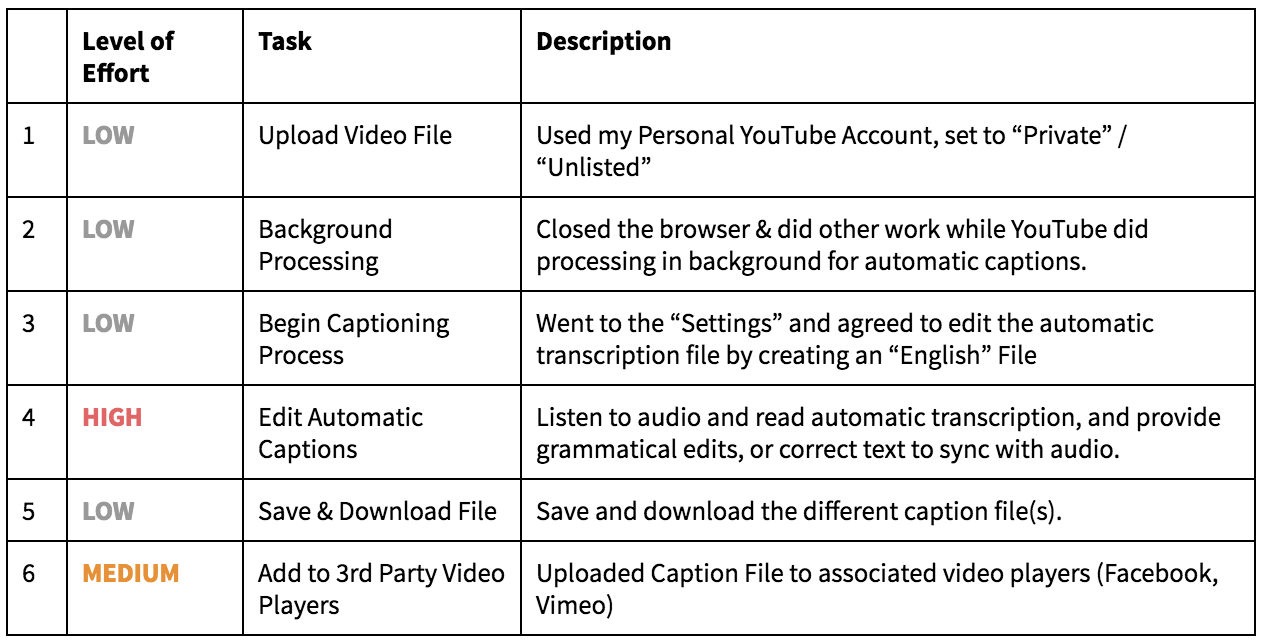
In the grand scheme of things, this is a reasonably low-to-medium level effort that increases your SEO, user engagement, and accessibility.
What to do if you don’t own the video
At DrupalCon New Orleans, David Spira and I presented on “ Easy Accessibility in Drupal 8: Practical, Compassionate, and Cost Effective” and the Drupal Association graciously handled all the audio/visual media and posted it on their YouTube channel. This was great, but it meant that the DA owned the video, not David and I.
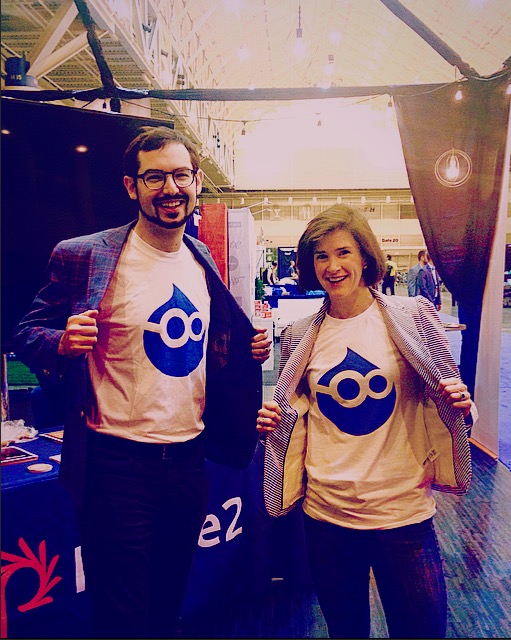
If you do not own the video you'd like to caption, it is not possible to edit the Subtitle track. So what we did to “get around” this, without adding any undue burden on Drupal Association, was the following:
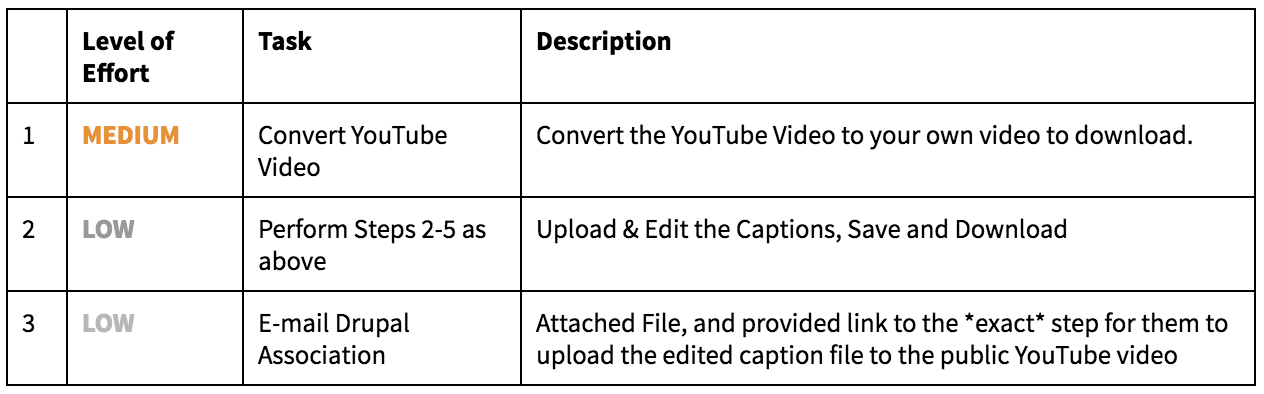
By doing this, I made it very easy for the Drupal Association to make their videos more accessible. A win all around, right?
YouTube Step by Step Instructions
Lastly, if I haven’t convinced you yet that it’s in your best interest to caption the videos yourself, please at minimum consider the “Community-Generated” captioning option. It’s a setting on your video that allows the community to participate in cleaning up, editing, and adjusting the caption file for you. You can learn more about it on YouTube’s Captioning Tutorial.